
Here in this post, you can Free Download Typography 3 Photoshop Action MTMYK43 compress files through the below link. Create this advanced portrait typography photo effect from your photos in just a few clicks! Open your photo, just brush over your subject and just play the action. It is really that easy! Creating these advanced typography effects has never been so easy. You Can Also Download Typography Art Photoshop Action.
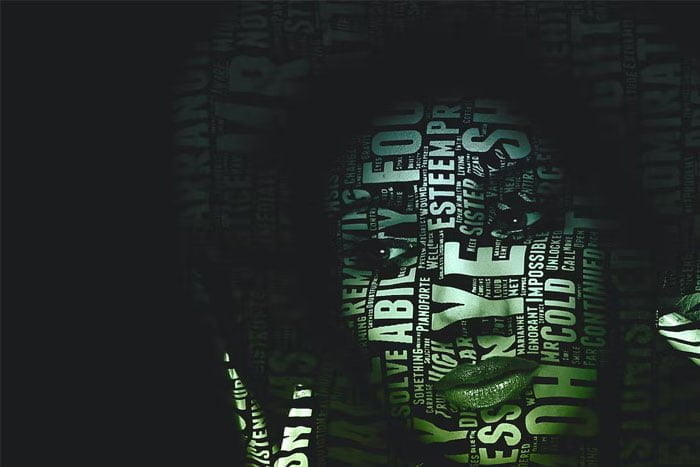
The action do all the work for you, giving you fully layered and customizable results that you can further modify. Each element is a single layer. There are 4 unique text layouts included . You can also create your own text layout through third-party website (link included in readme ) and use your own text and font. The action also creates 35 color looks for you to choose from. You Can Also Download Vector Typography Photoshop Action.
Screenshot Images of Typography 3 Photoshop Action:
Below I have shared screenshot images of Typography Photoshop Action to get a better idea before downloading.

Characteristics:
- Simple, easy and fun to use — even for beginners.
- Save hours and days of work.
- Fully layered and customizable results — each element is a single layer.
- Lots of options to customize the results.
- 4 unique text layouts included.
- Create your own text layout with your own text and font.
- 35 preset color looks included.
- Video tutorial included.
Compatibility:
The action is tested and working in Photoshop (English versions) CS3, CS4, CS5, CS6, CC, CC 2015.5, CC 2017, CC 2018, CC 2019, CC 2020+.
The action only works in English versions of Photoshop. If you use another language, you must change the language to English. After playing the action you can change it back to your native language. Link to video tutorial on language change is included in readme file .
Zip File Password: freegfx4u.com






