
If you have ever wanted to pick up a digital brush and create lifelike portraits, this Photoshop painting tutorial is a fantastic place to start. I know it can feel pretty intimidating to stare at a blank canvas, but having a professional artist walk you through the process makes it much easier to digest. Whether you are a total beginner or just want to refine your blending techniques, you can find a lot of helpful resources in our video courses section to sharpen your creative skills. This lesson is all about understanding how to capture light, shadow, and skin tones to make a portrait feel real. By following along with this guide, you will learn the secrets to building a face layer by layer, turning a simple sketch into a piece of art that you can be proud to show off.
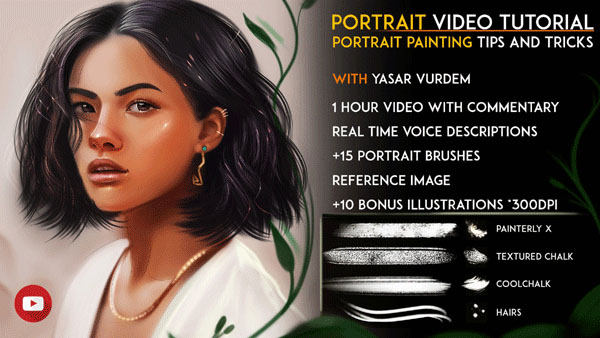
Overview of Portrait Painting in Photoshop
This tutorial is a full one-hour video where I explain every step of the process with clear voice descriptions. I don’t just show you a time-lapse; I actually talk you through the “why” behind each stroke, which is the best way to actually learn the craft. To make sure you have the right tools for the job, I’m including my personal “Vurdem” portrait brushes that I use for my own work. These brushes are specifically designed to help with smooth blending and adding those fine details that make a portrait pop. You won’t have to guess which settings to use, as you will see exactly how I set up my workspace for success.
Along with the main video, I’ve included the reference images I used so you can paint the exact same portrait alongside me. I am also throwing in some bonus illustrations and extra materials to keep you inspired even after the lesson is over. It’s a complete package that gives you everything you need to start your journey into digital portraiture with confidence.
Main Features
- A full 1-hour video tutorial covering the entire portrait painting process.
- Detailed voice descriptions and commentary explaining every technique used.
- Includes my custom Vurdem Portrait Brushes for professional results.
- Learn how to handle realistic skin tones, lighting, and textures.
- Step-by-step guidance on building a portrait from a blank canvas.
- Includes the actual reference images to help you follow along easily.
- Bonus illustrations included to provide extra inspiration for your art.
- Focuses on practical Photoshop tools without overly technical jargon.
- Perfect for artists transitioning from traditional to digital painting.
- Comes as a complete download package ready for immediate study.
Zip File Password: freegfx4u.com
Conclusion
Painting realistic portraits is a skill that takes practice, but this 1-hour tutorial gives you a massive head start. With professional brushes and clear voice instructions, you will have all the tools needed to improve your digital art. Download the pack today and start creating your own stunning Photoshop portraits.






