
Here in this post, you can Free Download Seasalt-co – Flares Collection Photoshop Actions + Overlays compress files through the below link. Seasalt Flares-Actions & Overlays” are packed with 26 Adobe® Photoshop® Actions and 84 digitally hand-crafted high resolution light flare overlays. The Light Flares include 17 sheer colour & lights, 4 Prismatic styled lights, 11 Rainbow Overlays and 52 sun & light bursts. With this stunning collection of actions and overlays you are able to give your images beautiful tone and light in minutes. You Can Also Download Meg Bitton Photography Overlays & Action Collection.
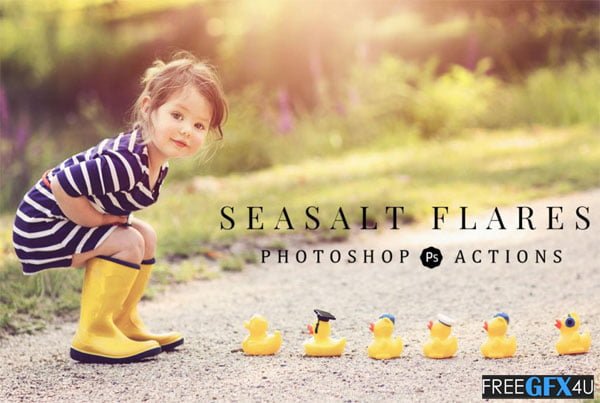
Packed with 26 Photoshop Actions and 84 digitally hand-crafted high-resolution light flare overlays. The Light Flares include 17 sheer color & lights, 4 Prismatic styled lights, 11 Rainbow Overlays, and 52 sun & light bursts. With this stunning collection of actions and overlays, you are able to give your images a beautiful tone and light in minutes! You Can Also Download Winter Bundle PS Actions + Overlays.
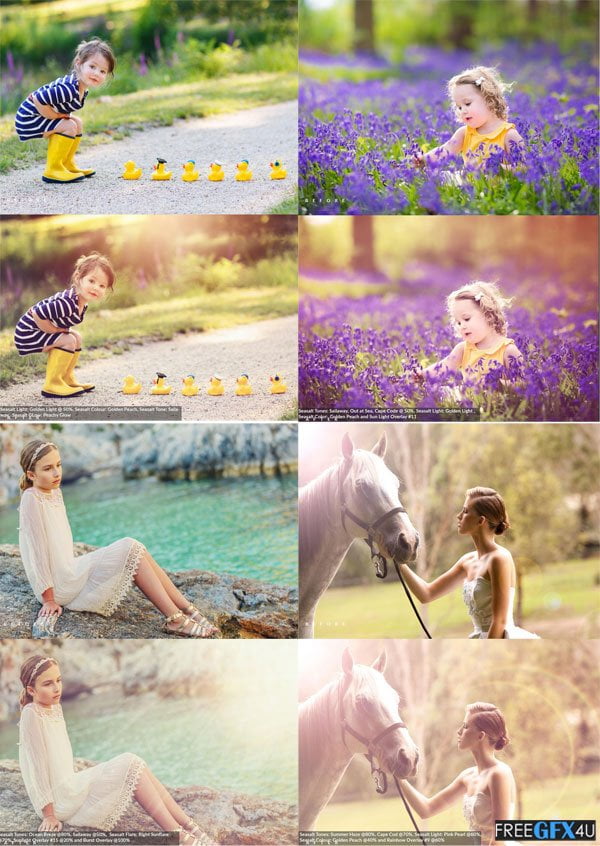
Before And After Images of Flares Collection Photoshop Actions + Overlays:
Below I have shared with you (Before And After) images after applying Flares Collection Photoshop Actions + Overlays. you can see those images to get a better idea before downloading.
COMPATIBILITY:
- Works with English versions of PS and PSE
- Adobe® Photoshop® CS6-CC & Photoshop Elements 11+
- Fully compatible with both PC and Mac
- For Lightroom Users, you will need a program that will allow for layers: Check out On1 Photo 10
- Software. Please note .atn (actions) can **NOT** be used in Lightroom.
- **NOTE** Our products are designed to be user-friendly as possible, however, you will need basic
- knowledge of Adobe Photoshop to use any of our products.
ACTIONS INCLUDED:
== SEASALT FLARE ==
{Golden Sun-flare with flare optics}
– FLARE | Left Sunflare (Golden)
– FLARE | Right Sunflare (Golden)
== SEASALT GLOW ==
{Top Center Dreamy Light}
– GLOW | Golden Glow
– GLOW | Peachy Glow
== SEASALT LIGHT ==
{Soft Top Lights}
– LIGHT | Sheer Light
– LIGHT | Pink Pearl
– LIGHT | Golden Light
– LIGHT | Blue Lagoon
– LIGHT | Golden Haze
== SEASALT BURSTS ==
{Moveable Light}
– BURST | Peachy Keen
– BURST | Cashmere
– BURST | Sweet Mint
– BURST | Lilac
– BURST | Morning Light
– BURST | Seaside Sunset
== SEASALT COLOUR ==
{Adds a dash of color tone}
– COLOUR | Golden Peach
– COLOUR | Soft Coral
– COLOUR | Soft Lavender
– COLOUR | Fresh Mint
– PLAY ALL COLOURS *{only available for full versions of PS}*
== SEASALT TONES ==
{Add-On overall tones}
– TONE | Fresh Water
– TONE | Out at Sea
– TONE | Castaway
– TONE | Sailaway
– TONE | Cape Cod
– TONE | Summer Haze
– TONE | Ocean Breeze
– PLAY ALL TONES *{only available for full versions of PS}*
OVERLAYS INCLUDED:
- 84 High-Resolution Overlays
- PNG format
- 5700 x 3900 pixels
- 300 dpi
- 4 Prism Lights
- 11 Rainbow Overlays
- 17 Sheer Colour & Light Overlays
- 52 Sun & Light Overlays
USING OVERLAYS:
- Place the Overlay on to your image. We use the drag and drop method.
- Change the blend mode and layer opacity to suit your needs. For Overlays with a transparent background, you can leave them in their original format with no need for changing the blend mode. For Overlays with a black background, we suggest changing the blend mode to “Screen”.
- Use a layer mask to non-destructively brush off any portion of the Overlay that you’d like to remove from your images (Ex: Erase back over skin tones).
Zip File Password: freegfx4u.com






