
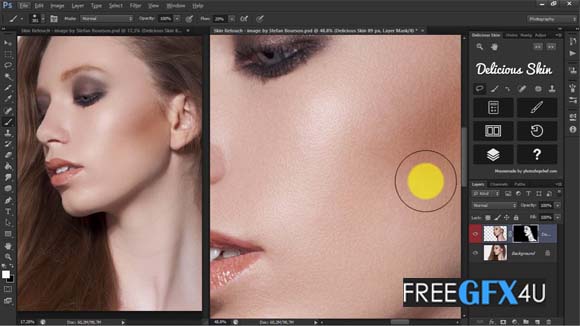
Here in this post, you’ll get a free download link of the Professional Delicious Skin Retouching Photoshop Panel v2 For Windows / Mac compress file from below. Delicious Skin v2 is the first tool on the panel, and it’s the most awesome. It smoothes out the skin and removes blemishes and acne-like crazy. You just select the face and apply the effect with a brush. You Can Also Download iCorrect Portrait V2.0 Plugin For Photoshop.
Delicious Skin produces great results by default, but you can fine-tune it by adjusting the settings. And, you can even batch-run the script on all opened images. You Can Also Download Retouch Pro Photoshop Panel For Lifetime Usage.
Screenshot Images of Skin Retouching v2 Photoshop Plugin:
Skin Smoothing Tools:
- Local Smoother” and “Surface Smoother” 2 more tools that will give you, even more, control smoothing out various skin issues. You can set exactly how and how much to smooth the skin with texture and smoothing radius, threshold, and intensity sliders.
Remover:
- Great tool for cleaning the skin from all kinds of spots, dirt, makeup fall off, or even facial hair! This will save you loads of time where doing this with a healing brush would take forever.
Frequency Separation:
- Never heard of Frequency Separation? It’s a popular technique that will allow you to fix all the usual facial issues like removing wrinkles, bags under the eyes, and blemishes, by dividing your image into two separate frequency layers. DR4’s frequency separation script will make the process easier and more precise than using actions or doing it manually.
Tone Changer:
- Tone changer is an amazing tool that can be used for various tone adjustments, like changing skin tone, matching skin tones in different parts of the image, correcting tones, or even dodging and burning.
Dodging and Burning:
- Dodging and Burning is a retouching technique used to selectively darken and lighten areas of the image. This script will allow you to create necessary layers quickly along with correction and visual help layers.
Masking Tools:
- In retouching, you often need to apply adjustment or filters specific parts of the image. DR4’s masking tools will help you quickly create and edit skin selections or any color range selections and apply them to existing or new layers.
Eyes and Teeth Adjustments:
- Need to whiten and brighten teeth, enhance eye iris, or cleanup whites? That’s a matter of seconds with the DR4 panel. Just click a button and paint with a brush to apply.
Sharpening:
- Sharpening tool with 3 blending modes and over-sharpening protection feature that’s great especially for skin texture sharpening.
Dual View:
- Dual View mode opens documents in two windows, allowing to set different zoom levels for each window. That means you can work on the zoomed image, and instantly see how the changes look like on a zoomed-out image. This is helpful to prevent over-editing your image.
Smart Liquify:
- Applies Liquify filter to a smart object, so you can adjust the liquify anytime. But what’s even better, this script allows you to update the contents of liquify layer, so you can change any layers below liquify and then update it with a single click.
Stamp Current and Below:
- This tool will create a new layer from current and all visible layers below, ignoring layers above. That’s the same as Photoshop’s Stamp Visible, but you don’t have to turn off layers above.
Below Link Skin Retouching Panel v2 Photoshop Plugin For Window/Mac
Winrar File Password: freegfx4u.com






