
This awesome Creative Market – Automatic Frame Creator Scenes Mock-up made by CreativeMarket and the first update Released In 2021. Automatic Frame Creator + Scenes – Mockup is a premium product. You Can Also Download 234 Creative Masking Photo Frames Shapes PSD Collection.
Screenshot Images of Automatic Frame Creator Scenes Mockup Template:
Below I am sharing with you jpg screenshots images of the Custom Frame Creator mockup to get a better idea before download, I hope you like it.
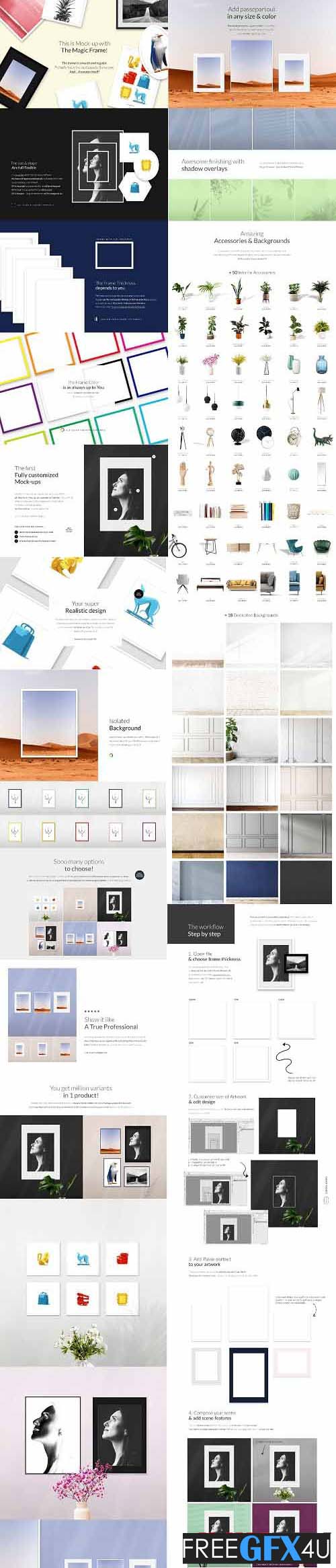
Automatic Frame Creator + Scenes – Mock-up:
Automatic Frame Creator Mock-up + Scenes with Frames on the wall with first Self-generating Frame Mock-up based on the size and shape of your Artwork automatic frame self-generating mockup.
This is Mock-up with The Magic Frame! The frame is smooth and regular. Probably this is the most popular frame type. And… it creates itself!
The size & shape Are full flexible is no matter what is the size of your Artwork- the frame will appear automatically according to this what you put inside as your Artwork. If it is a rectangle- the generated frame will be rectangular. If it is a circle- the generated frame will be round. If it is the hexagon- The generated frame will be hexagonal, etc.
The Frame Thickness depends on you The frame can also have the size according to your needs. You can use the most popular thickness which is attached as defaults and ready-to-use or if you wish- make your own thickness. Information on what to do to change it is included in, Manual.
The Frame Color is as always up to You can choose all colors which you wish. As always, you’re welcome.
The First Fully customized Mock-ups:
With White Mocca mock-ups you can truly enjoy countless possibilities. All elements on mock-ups are separated and editable. Just drag and drop – it’s really simple as that. Let’s create billions of different designs! You can edit or choose: custom frame size & shape (every you need), frame thickness and color, artwork design (with Passepartout option included).
Your Super Realistic Design:
You always wanted to make your designs as realistic as possible. Now You can create visuals that are extremely lifelike. Our mock-ups are equipped with the advanced transformation tool (for example puppet warp transformation). We have created them with the highest precision. That provides an incredibly realistic effect on your visual. Sounds as easy as pie? It is.
The isolated Background Model on mock-ups is always isolated from the background. It means you can easily stay with white canvas, change color or simply turn it off (making it transparent).
Extremely Beautiful Color:
Discover the first mock-ups that help you create a great image in bright or dark tones and incredible depth of color. You don’t need any additional clicks or switches between different color versions. It all lies in our secret blending method that works phenomenally with all colors.
Add Passepartout in any size & color Turn on/off Passepartout option available in Smart Objects of every artwork. You can make it any size you need. Also, make your own color as you wish.
Awesome finishing with shadow overlays Turn on the extra overlay effect to finish your frame scene. You got 8 variants: : light/shadow & floral with leaves.
Amazing Accessories & Backgrounds:
In separated files, you will find a big collection of various Accessories and Backgrounds. Open chosen .psd file, select the appropriate folder and then drag and drop it to your composition. Work as easy you’ve always dreamed of.
The workflow Step by step It’s really user-friendly, let’s sum up what is available to do:
- Open file & choose frame thickness- You can use prepared frames included in Creators or choose variants from Many Frames Thickness file. If you need any other variant, you can set any frame thickness you need! All instructions can find in the Manual (attached file .pdf).
- Customize the size of the Artwork & edit the design – Add your own Artwork in any size you need. The frame will create automatically!
- Add Passe-partout to your artwork- To finish your artwork you are able to add passe-partout to your frame. Create any size, shape, and color or choose from included versions inside Smart Object. All is ready to use.
- Compose your scene & add scene features- You can add more elements that fully your scene: accessories and scene overlays. Let’s explore and make a composition with them all. You can move, transform, scale … all that you need.
Sooo many options to choose from:
One mock-up and so many angles to choose from! You get 7 different frames with many finishing & passe-partout to choose from. Just drag and drop to put design and make an outstanding presentation. Just like that? Sure, just try it.
Show it like A True Professional:
Now you can present your products the way only the best global e-stores do. Every single mock-up generator was inspired by the best-selling photos and look books online. We follow digital trends and know-how online marketing works. Trust us, we’re designers too.
You get a million variants in 1 product! One mock-up and so many options to choose from! You get the file that allows you to generate any shape & size frame you need! Just drag and drop your Artwork in Smart Object to put design, generate a frame, and add your own accessories to make an outstanding presentation.
Awesome E-marketing tool:
Start using mock-ups not only for design but also market researches, prototyping, and reviewing. Now you can easily use our mock-up to check your customers’ reactions.






